JVM Startup Options
Protector4J lets you set JVM startup options while packaging, and lets you add options temporarily or edit the generated startup scripts after deployment. For the other advanced options in the GUI, see Protector4J Advanced Mode Settings.
1. Four ways to set them
| Method | What it affects | Survives repackaging | Best for |
|---|---|---|---|
| JVM startup options in the GUI | The startup scripts generated for every platform in this run | Yes, as long as you still have the task settings | Everyday interactive packaging |
--jvm-option on the command line | The startup scripts generated for every platform in this run | Yes, the command or task file serves as the source of truth | CI/CD and repeatable builds |
Editing run.sh, run.bat, or the Tomcat scripts | Only the deployed directory you edited | No, repackaging overwrites it | Urgent or environment-specific changes after deployment |
The APP_JAVA_OPTS environment variable | Only the current process or environment | Nothing is written to disk | Temporary diagnostics, and injection from a container or service environment |
Keep long-lived options in the GUI task or the CLI command, and use APP_JAVA_OPTS for temporary overrides. If you edit a generated script directly, record the change in your deployment notes — you will have to reapply it the next time you package.
2. Setting them in the GUI
- Choose Advanced — customise the options yourself on the input page. From simple mode, click Customize… on the final page to reach the advanced options.
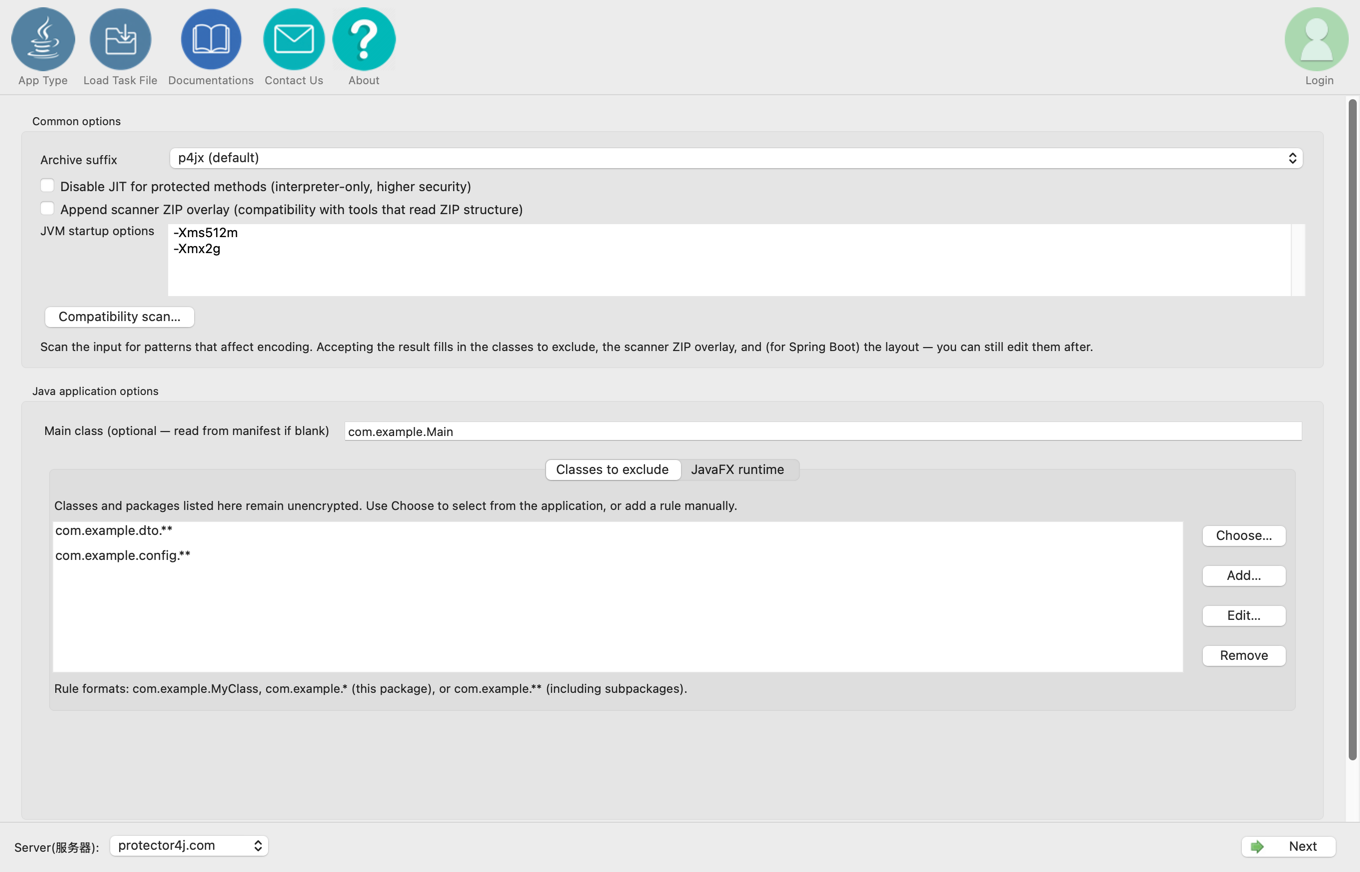
- Under Common options, find JVM startup options.
- Enter one complete option per line, for example:
-Xms512m
-Xmx2g
-Dfile.encoding=UTF-8
-Dspring.profiles.active=prod
- Check them in the final summary, then run protection.
The options are written into the generated run.sh and run.bat. On macOS, run.command calls run.sh, so it uses the same options. For Tomcat, they are also placed on the startup paths in bin/catalina.sh and bin/catalina.bat. Library Encryption produces only an archive and no startup scripts, so the setting is not available there.
3. Setting them on the command line
Repeat --jvm-option once per option. Do not pack several JVM options into a single value.
p4j javaapp app.jar dist \
  --jvm-option -Xms512m \
  --jvm-option -Xmx2g \
  --jvm-option -Dfile.encoding=UTF-8
For Spring Boot:
p4j springboot app.jar dist \
  --jvm-option -Xms1g \
  --jvm-option -Xmx2g
For Tomcat:
p4j tomcat app.war dist \
  --context /app \
  --jvm-option -Xms1g \
  --jvm-option -Xmx2g
Quote an option as a whole if it contains spaces or special characters:
--jvm-option '-Dexample.message=hello world'
The packager escapes each option separately for shell and batch scripts, respecting these boundaries.
4. Editing the scripts on macOS and Linux
For ordinary Java and Spring Boot applications, edit run.sh in the output directory. run.command simply delegates to run.sh, so there is nothing to change there.
Find the generated JVM_OPTS=(...) line and any JVM_OPTS+=(...) lines after it, then add your own line before the APP_JAVA_OPTS check.
JVM_OPTS+=("-Xms512m" "-Xmx2g" "-Dfile.encoding=UTF-8")
if [ -n "${APP_JAVA_OPTS:-}" ]; then
  # ...
fi
Do not remove the --add-opens, --module-path, or --add-modules options the packager generated for Spring Boot or JavaFX.
For Tomcat, edit bin/catalina.sh and add your line after JVM_OPTS=(...) inside run_java().
run_java() {
  JVM_OPTS=(...)
  JVM_OPTS+=("-Xms1g" "-Xmx2g")
  # ...
}
This covers both running in the foreground with run.sh and starting in the background with bin/startup.sh.
5. Editing the scripts on Windows
For ordinary Java and Spring Boot applications, edit run.bat in the output directory. Find the generated set "JVM_OPTS=..." line and add your own before the APP_JAVA_OPTS check:
set "JVM_OPTS=%JVM_OPTS% -Xms512m -Xmx2g -Dfile.encoding=UTF-8"
if defined APP_JAVA_OPTS set "JVM_OPTS=%JVM_OPTS% %APP_JAVA_OPTS%"
Keep the existing contents of JVM_OPTS. Do not remove the internal options that Spring Boot or JavaFX needs.
Tomcat in the foreground on Windows
Edit bin\catalina.bat and add your line after the existing set "JVM_OPTS=...":
set "JVM_OPTS=%JVM_OPTS% -Xms1g -Xmx2g"
This applies to run.bat and to bin\catalina.bat run.
Tomcat in the background on Windows
bin\startup.bat uses PowerShell to spawn a background process. The simplest permanent change is to set APP_JAVA_OPTS before it calls catalina.bat:
@echo off
set "APP_JAVA_OPTS=-Xms1g -Xmx2g"
call "%~dp0catalina.bat" start %*
exit /b %ERRORLEVEL%
To cover foreground and background without maintaining two scripts, it is better to regenerate the Tomcat package with --jvm-option from the GUI or CLI.
6. Using APP_JAVA_OPTS for a single run
macOS and Linux
APP_JAVA_OPTS="-Xms512m -Xmx2g" ./run.sh
For Tomcat:
APP_JAVA_OPTS="-Xms1g -Xmx2g" ./bin/startup.sh
Windows CMD
Set it for the current CMD session. Later commands inherit it; clear it with set APP_JAVA_OPTS=.
set "APP_JAVA_OPTS=-Xms512m -Xmx2g"
run.bat
To keep it local and restore the environment afterwards:
setlocal
set "APP_JAVA_OPTS=-Xms512m -Xmx2g"
call run.bat
endlocal
For Tomcat:
set "APP_JAVA_OPTS=-Xms1g -Xmx2g"
bin\startup.bat
Windows PowerShell
$env:APP_JAVA_OPTS = '-Xms512m -Xmx2g'
.\run.bat
Remove-Item Env:APP_JAVA_OPTS
7. Ordering and caveats
- The options the tool generates come first, then the ones you set in the GUI or CLI, and
APP_JAVA_OPTSis appended last. - For some JVM options a later value overrides an earlier one, but not every option can be repeated safely — do not rely on repetition to override a value.
APP_JAVA_OPTSsplits on spaces, so it cannot carry a single option that contains spaces. Use the GUI,--jvm-option, or edit the script array for those.- JVM options must come before the main class or
-jar; application arguments go after therun.shorrun.batcommand. - After changing heap sizes, verify them against your container memory limit, the memory available on the host, and your real load.
- Repackaging overwrites the startup scripts, and manual changes are not merged back in automatically.